
Your driving school books your interim test and your practical exam with the CBR, but only after you have given permission. That is called authorising (machtigen), and you arrange it yourself in a few minutes in Mijn CBR with your DigiD. Below you click through the screens step by step.
Why authorise?
The CBR only schedules a test or exam when the candidate asks for it. With an authorisation you tell the CBR: my driving school may do this for me. Without an authorisation your driving school can't book anything in your name, however far along you are with your lessons.
- Booking only An authorisation only gives your driving school the right to book a test or exam in your name.
- You hear it straight away As soon as something is booked in your name, you get an email right away. So you always see what is happening.
What do you need?
Do you already have a DigiD?
Apply for a DigiD first
Apply for your DigiD at digid.nl. The activation code arrives by post after a few working days. Once you have activated it, you can go on with authorising.
Always use your own DigiD. Using someone else's is not allowed, not even your parents'.
Then all you need is the driving school number
Every driving school has its own CBR driving school number. You get it from your driving school, and it is also listed with the school's details in the CBR Rijschoolzoeker (driving school finder). In Mijn CBR you can also search for the school by name and town.
Keep your email address at hand too: that is where the confirmation arrives.
How to authorise your driving school, step by step
This is what authorising really looks like. Click through the steps with the buttons.
-
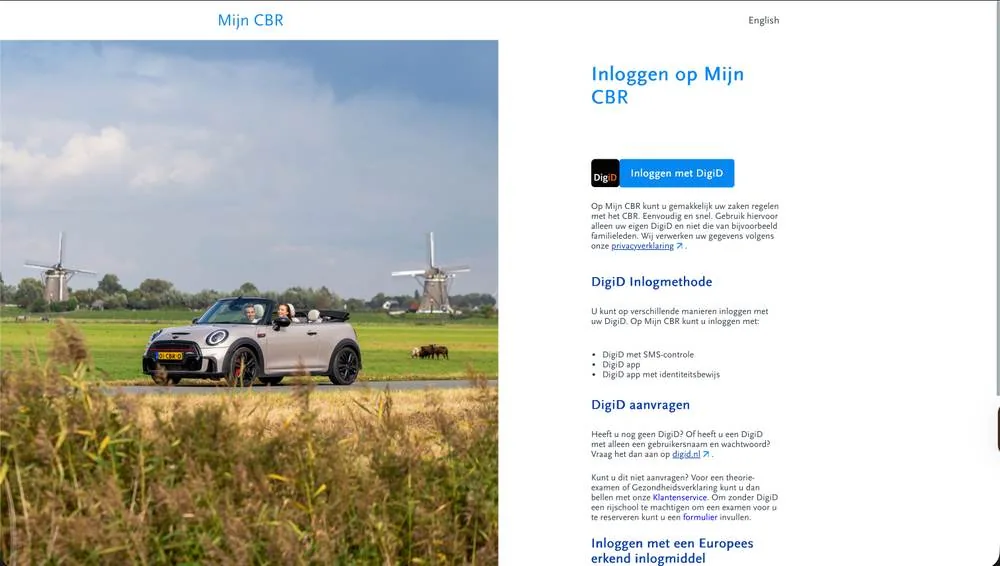
Go to Mijn CBR
Go to mijn.cbr.nl and click Inloggen met DigiD (log in with DigiD).
-
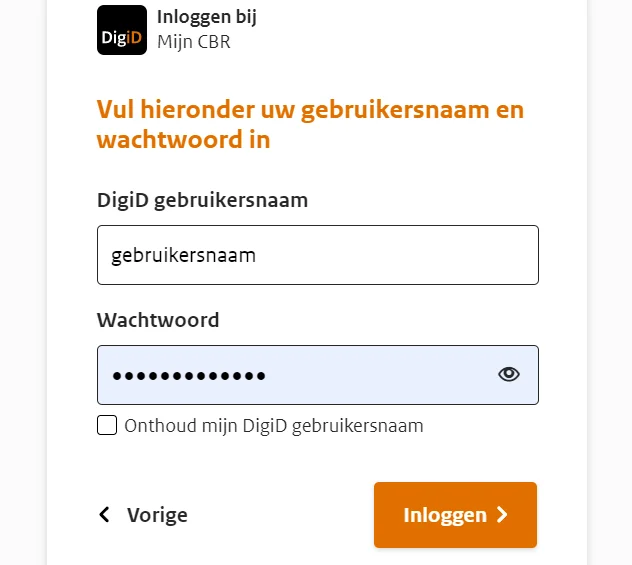
Log in with your DigiD
Log in with your own DigiD, using the DigiD app or your username and password.
-
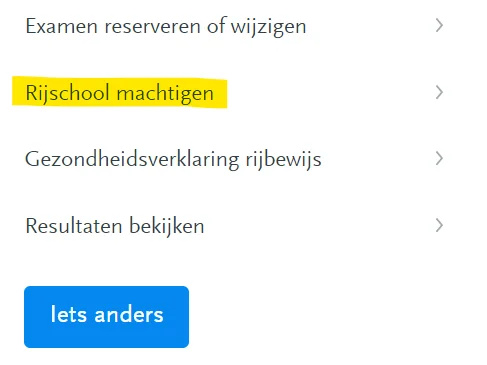
Choose Rijschool machtigen
On your start page in Mijn CBR, choose Rijschool machtigen (authorise driving school).
-
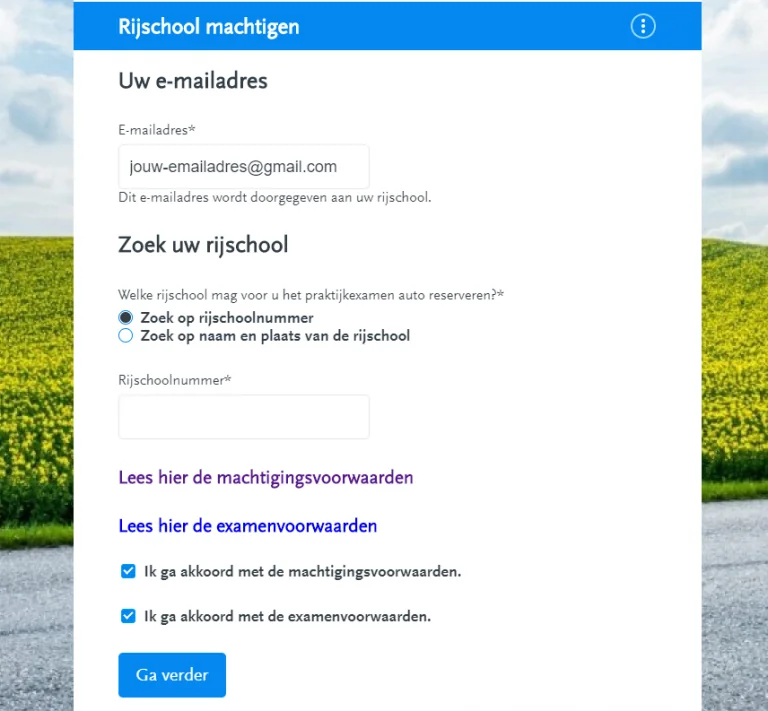
Fill in the form
Enter your email address and look up your driving school by driving school number or by name and town. Tick what the authorisation covers: the interim test, the practical exam or both.
-
Accept the conditions
Read the authorisation conditions and the exam conditions, tick both boxes and click Ga verder (continue).
-
Check and authorise
Check your email address and the name of the driving school. Is everything correct? Then click Machtigen (authorise).
-
The confirmation
You and your driving school both get a confirmation by email. No email? Check your spam folder and look in Mijn CBR under Lopende zaken (current matters) to see whether the authorisation is there.
Images: via CBR
When to authorise and how long it's valid
Preferably early, for example after your first lessons. Then everything is already arranged when your instructor says you're ready.
- After authorisingThe authorisation is valid for 1 year
The date of your test or exam must fall before the expiry date.
- 5 months before it endsYou can extend it
You automatically get an email from the CBR. You extend it in Mijn CBR, and the authorisation then runs for another year. You can do that as often as needed.
Checking, switching or withdrawing
Which authorisations do I have?
In Mijn CBR you can see under Lopende zaken which authorisations are active.
I want to switch to another driving school
Withdraw the authorisation for your old driving school yourself with the Machtiging intrekken (withdraw authorisation) button, then authorise the new driving school. The CBR doesn't charge administration costs for this.
A test or exam is already scheduled
You can only withdraw while nothing has been scheduled for you yet. If a date is already set, it has to be cancelled first: send the CBR a cancellation request at least two weeks in advance and wait for the confirmation before you withdraw the authorisation.
Authorising via Mijn CBR doesn't work
Then you can do it in writing with the form Machtiging rijschool door kandidaat (authorisation of a driving school by the candidate), together with a copy of your valid ID. Expect about a week of processing time.
Sources: CBR: authorising your driving school, CBR: steps to authorise your instructor, CBR: withdrawing an authorisation